How to Adjust or Replace a Well Pressure Switch
The Well Guide
Updated October 22, 2026 · 11 min read
Some links on this page are affiliate links. If you purchase through them, we may earn a small commission at no extra cost to you. This does not affect our recommendations. Affiliate disclosure.
TL;DR
- The pressure switch turns your well pump on at the cut-in pressure and off at the cut-out pressure. Most homes are set to 30/50 or 40/60 PSI.
- The large nut raises or lowers both settings together. The small nut changes only the cut-out. Turn clockwise to raise, counterclockwise to lower.
- After changing the cut-in, reset the pressure tank's air charge to 2 PSI below it. Skip this and the pump will short-cycle.
- A new switch costs $20 to $50 and takes about 30 minutes to install. A contractor typically charges $150 to $300.
- The switch carries 240V. Turn off the breaker and confirm the power is dead before you open the cover.
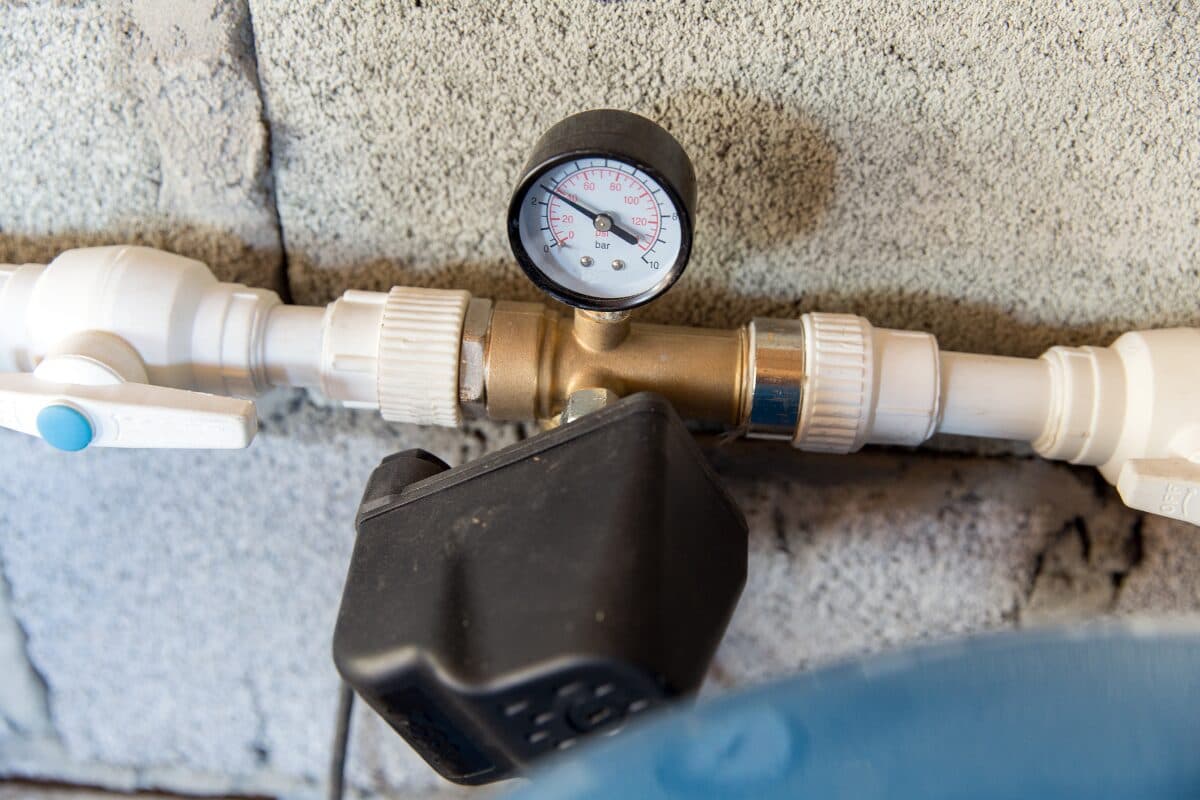
The pressure switch is the small gray box on the pipe near your pressure tank. It's the brain of a well system: it watches the water pressure and tells the pump when to run. Most of the time you never think about it. But if you want stronger water pressure, or the pump won't turn on or off, the switch is usually the first thing to adjust or replace.
The Adjust-or-Replace Rule
Match what's going on to the right fix:
| What's happening | What to do |
|---|---|
| Water pressure works but feels weak, and the switch is in good shape | Adjust the switch, for example from 30/50 to 40/60 |
| Pump turns on and off every few seconds | Check the tank's air charge first. Adjusting the switch rarely fixes this. See well pump short cycling. |
| Pump won't turn on, and tapping the switch cover makes it start | Replace the switch. The contacts are worn. |
| Pump won't shut off | Check for a leak or a clogged sensing port, then replace the switch if the contacts are stuck. See well pump running constantly. |
| Switch chatters or buzzes | Replace it, and check the sensing port for clogs |
| Burned, pitted, or melted contacts, or bugs inside | Replace it |
| Switch froze and cracked | Replace it. See frozen well pipes. |
| Pressure is low everywhere and the switch settings are normal | The switch may not be the problem. See low well water pressure. |
5-Minute Diagnostic: Check Your Switch and Settings
You'll need a flashlight and a pen. Don't open the switch yet.
- Read the settings. The cut-in and cut-out are usually printed on the switch cover or a label, such as "30/50" or "40/60."
- Watch a full cycle. Open a faucet and watch the pressure gauge near the tank. Note where the pump turns on (cut-in) and where it shuts off (cut-out). They should be close to the printed settings.
- Check the gap. Cut-out minus cut-in is the differential. It's normally 20 PSI.
- Look for a lever on the side of the switch. If there's one, you have a low-pressure cutoff switch, covered below.
- Note the brand and model. Square D is the most common. The model number is on the label inside or on the side of the cover.
If the gauge reads very differently from the printed settings, the gauge itself may have failed. Gauges are cheap and wear out, so replace one if it sticks or reads zero with water flowing. A 0 to 100 PSI pressure gauge with a 1/4-inch threaded fitting fits most systems. To swap it, turn off the pump's breaker, drain the system to zero, unscrew the old gauge, wrap the threads with sealant, and screw in the new one.
How a Pressure Switch Works
Inside the cover are two springs on threaded posts, each with a nut:
- Large nut (range spring): Moves both the cut-in and the cut-out up or down together. Turning it doesn't change the gap between them.
- Small nut (differential spring): Changes only the cut-out, which widens or narrows the gap.
Turning either nut clockwise raises pressure. Turning it counterclockwise lowers it. Some switches have only the large nut, so the gap can't be changed.
These directions apply to Square D Pumptrol switches, the most common type. Other brands, such as Hubbell (Furnas), and the controllers on constant-pressure systems adjust differently. If your switch isn't a Square D, follow its own instructions, usually printed inside the cover.
Under the switch is a small sensing port, a 1/4-inch fitting where water pressure pushes on a diaphragm. If that port clogs with sediment or freezes, the switch can't read the pressure correctly.
How to Adjust a Well Pressure Switch
The most common change is raising the pressure from 30/50 to 40/60 for stronger water pressure. Here's how.
Before You Start
- Check what your system can handle. Square D's standard switches go up to a 65 PSI cut-out. Your pump must be able to reach the new cut-out, and the cut-out must stay well below your pressure relief valve's rating (often 75 to 100 PSI, printed on the valve). If the pump can't reach the cut-out, it will run constantly.
- Have a voltage tester ready. You'll use it to confirm the power is off.
Step-by-Step
- Turn off the pump's breaker. It's a double-pole breaker, usually labeled "well" or "pump."
- Remove the switch cover. It's usually held on by one nut on top.
- Confirm the power is dead. Hold a non-contact voltage tester near the wire terminals. If it beeps or lights up, stop and find the right breaker.
- Raise the cut-in and cut-out together. Turn the large nut clockwise. Make small changes, one full turn at a time.
- Put the cover back on and turn the breaker on. Open a faucet and watch the gauge through a full cycle to see where the pump now turns on and off.
- Repeat until you hit your target. Breaker off, confirm dead, adjust, breaker on, test. Never adjust with the power on.
- Adjust the cut-out only if needed. If you want to change the gap, turn the small nut clockwise to raise the cut-out only. Keep the gap at 20 PSI unless your tank manufacturer says otherwise.
- Reset the tank's air charge if you changed the cut-in. See the next section.
Reset the Pressure Tank Air Charge
This step is what most people skip, and it's why the pump starts short-cycling after an adjustment.
- Turn off the pump's breaker.
- Open a faucet and drain the system until the pressure gauge reads zero.
- Check the air valve on top of the tank (it looks like a tire valve) with a tire pressure gauge.
- Adjust it to 2 PSI below your new cut-in. For a 40/60 setting, that's 38 PSI. To add air, use a bike pump or a portable air inflator. To release air, press the pin in the center of the valve briefly, then recheck.
- Close the faucet and turn the breaker back on.
Our pressure tank guide covers the air charge in more detail.
Low-Pressure Cutoff Switches
Some pressure switches have a lever on the side. That's a low-pressure cutoff. If pressure drops about 10 PSI below the cut-in, which happens when a well runs dry or a pipe bursts, the switch shuts the pump off so it doesn't run dry and burn out.
To restart after a cutoff: fix the cause first, then hold the lever in the start position until the pressure climbs past the cut-in, and release it.
If the cutoff trips often, the well may be running low. See well running dry. If you're replacing a switch and your well has ever run low, upgrading to a low-pressure cutoff model is cheap insurance for a pump that costs far more to replace.
How to Replace a Well Pressure Switch
Choose the Right Replacement
Match these to your old switch:
- Pressure setting: 30/50 or 40/60. You can adjust within the switch's range later.
- Low-pressure cutoff: get one if your old switch had a lever, or if you want the protection.
- Voltage: most well pumps are 240V. Standard switches handle both 120V and 240V, but confirm on the box.
The Square D Pumptrol 9013FSG2J21 (30/50), Square D Pumptrol 9013FSG2J24 (40/60), and Square D Pumptrol 9013FSG2J24M4 (40/60 with low-pressure cutoff) cover most homes.
Understand the Wiring
A standard pressure switch has four wire terminals and a ground screw:
- LINE terminals (2): bring power in from the breaker. On a Square D switch they're usually the two outer terminals, marked LINE.
- LOAD terminals (2): send power out to the pump, or to the control box on a 3-wire pump. They're usually the two inner terminals, marked LOAD or MOTOR.
- Ground screw (green): the bare or green ground wires from both cables attach here.
Each cable has two insulated wires. The cable from the breaker goes to LINE, and the cable to the pump or control box goes to LOAD. Mixing them up is the most common replacement mistake. The switch may still work, but the LOAD terminals stay live even when the switch turns the pump off, and the low-pressure cutoff won't work correctly.
Step-by-Step
- Turn off the pump's breaker and confirm the power is dead with a voltage tester.
- Drain the system. Open a faucet until the pressure gauge reads zero.
- Photograph the wiring before touching anything, then label each wire.
- Disconnect the wires from the terminals.
- Unscrew the old switch from its fitting. Hold the fitting below it with a second wrench so you don't twist the pipe.
- Clean or replace the fitting under the switch. Sediment clogs this port and causes many switch problems. If it's crusted or rusted, replace the fitting.
- Apply pipe thread sealant to the fitting threads and screw on the new switch hand-tight, then snug it with a wrench.
- Reconnect the wires exactly as they were: breaker cable to LINE, pump cable to LOAD, grounds to the green screw. Tighten each terminal.
- Put the cover on, turn the breaker on, and watch a full cycle on the gauge. Check the fitting for leaks.
- Set the tank's air charge to 2 PSI below the new cut-in, as described above.
If anything about the wiring looks different from your photo, or the wires are scorched, stop and call a pro.
What to Buy
| Product | What it's for | Price tier |
|---|---|---|
| Square D Pumptrol 9013FSG2J21 (30/50) | Standard replacement switch, 30/50 setting | $ |
| Square D Pumptrol 9013FSG2J24 (40/60) | Standard replacement switch, 40/60 setting | $ |
| Square D Pumptrol 9013FSG2J24M4 (40/60, low-pressure cutoff) | Protects the pump if the well runs low or a pipe bursts | $ |
| Klein Tools NCVT1P Non-Contact Voltage Tester | Confirms the power is off before you touch anything | $ |
| Digital Tire Pressure Gauge | Checks and sets the tank's air charge | $ |
| RectorSeal T Plus 2 Pipe Thread Sealant | Seals the switch fitting threads | $ |
| 0 to 100 PSI Well Pressure Gauge | Replaces a stuck or inaccurate system gauge | $ |
| Portable Air Inflator | Adds air to the pressure tank when setting the air charge | $$ |
If you're replacing a switch, get the voltage tester even if you have one somewhere. It's the step that keeps this a safe DIY job.
Cost Breakdown and 10-Year Total Cost of Ownership
| Option | Upfront cost | Ongoing cost | 10-year total cost |
|---|---|---|---|
| Adjust the switch yourself | $0, or about $15 to $30 for a voltage tester and tire gauge | None | $0 to $30 |
| Replace the switch yourself | $20 to $50 for the switch, plus a few dollars in sealant | Switches can wear out, so you may replace it again | About $40 to $100 |
| Hire a contractor to replace it | $150 to $300 including parts and labor | Same | About $150 to $600 |
| Upgrade to a low-pressure cutoff switch | A little more than a standard switch | None | Small compared with one pump replacement. See our well pump replacement cost guide. |
Adjusting and replacing a switch are two of the cheapest well repairs there are. The real cost risk is ignoring a failing switch until the pump runs dry or burns out.
Common Mistakes
- Adjusting with the power on. The terminals carry 240V, a few inches from your fingers and next to water pipes. Breaker off and test every time.
- Skipping the tank air charge. Raise the cut-in without resetting the tank, and the pump will short-cycle.
- Using adjustment to fix short-cycling. Short-cycling is almost always a tank problem. Turning the nuts won't fix it.
- Setting the cut-out higher than the pump can reach. The pump will run nonstop and can overheat. If it never shuts off after an adjustment, turn the power off and lower the setting.
- Cranking the nut several turns at once. Small changes and a test after each one.
- Twisting the pipe when removing the switch. Use a second wrench to hold the fitting.
- Ignoring a clogged sensing port. A new switch on a clogged fitting will fail the same way. Clean or replace the fitting.
- Losing track of the wiring. Take a photo before you disconnect anything.
- Swapping LINE and LOAD. The breaker cable goes to LINE and the pump cable goes to LOAD. Swapped wires leave parts of the switch live when they shouldn't be.
- Following Square D directions on a different switch. Other brands adjust differently. Check the instructions inside the cover.
When to Call a Pro
- You're not comfortable working near a 240V circuit
- Wires are scorched, melted, or don't match the diagram
- The switch is fine but the pump still won't run
- You want to go above 60 PSI, or aren't sure what your pump and tank can handle
- You're considering a constant-pressure system instead of a standard switch
- The fitting or pipe below the switch is badly corroded
DIY-friendly: reading the settings, adjusting the nuts with the power off, setting the tank's air charge, and replacing the switch for most homeowners comfortable with basic wiring.
Get Expert Well Help
Connect with qualified well professionals in your area. Free quotes, no obligation.
Frequently Asked Questions
How do I increase my well water pressure?
If your system is set to 30/50, raising it to 40/60 is the most common fix. Turn the large nut on the pressure switch clockwise with the power off, then reset the tank's air charge to 2 PSI below the new cut-in. If pressure is low even at normal settings, see our low water pressure guide.
Which nut on the pressure switch does what?
The large nut moves both the cut-in and the cut-out together. The small nut changes only the cut-out. Clockwise raises pressure and counterclockwise lowers it.
What should my well pressure switch be set to?
Most homes use 30/50 or 40/60. 40/60 gives stronger pressure and is the most common setting today. Your pump and tank need to be able to handle it.
How long does a well pressure switch last?
Many last years, but the contacts wear with every pump cycle, and sediment or insects can cause failure sooner. Short-cycling wears a switch out much faster.
How much does it cost to replace a well pressure switch?
The switch costs $20 to $50, and a homeowner can install it in about 30 minutes. A contractor typically charges $150 to $300 including parts and labor.
Can I replace a pressure switch myself?
Yes, if you're comfortable with basic wiring. Turn off the breaker, confirm the power is dead with a tester, photograph the wiring, and follow the steps above.
Why does my pump keep running after I adjusted the switch?
The cut-out is probably set higher than the pump can reach. Turn off the power and lower it a turn at a time until the pump shuts off normally.
What does the lever on my pressure switch do?
It's a low-pressure cutoff. It shuts off the pump if pressure drops about 10 PSI below the cut-in. Hold the lever in the start position until the pressure builds to restart it.
Glossary
- Pressure switch:
- The control that turns the well pump on and off based on water pressure.
- Cut-in pressure:
- The pressure at which the switch turns the pump on.
- Cut-out pressure:
- The pressure at which the switch turns the pump off.
- Differential:
- The gap between cut-in and cut-out, usually 20 PSI.
- Range nut:
- The large nut that moves both settings together.
- Differential nut:
- The small nut that changes only the cut-out.
- Sensing port:
- The small fitting under the switch where water pressure reaches the switch's diaphragm.
- Low-pressure cutoff:
- A switch feature that shuts the pump off if pressure drops too low.
- Air charge (pre-charge):
- The air pressure inside the pressure tank, set 2 PSI below the cut-in.
- Pressure relief valve:
- A safety valve that releases water if system pressure gets dangerously high.
Related Guides
The Home Guide Network Editorial Team
Our guides are researched and written by the editorial team at The Home Guide Network, an independent publisher covering home systems for homeowners. We cover garages, basements, septic systems, and wells across four dedicated guide sites. Learn more at thehome.guide.